← Back to Apps
Lab 3776
Windows MoniCon

MoniCon3776win

A management tool that allows intuitive control of brightness, contrast, and input sources in multi-monitor environments. Manage all your monitors from a single screen, with instant hotkey access.

Latest Loading...
Published Loading...
Distribution ZIP Package
Multi-Monitor Brightness Control DDC/CI Portable

Key Features

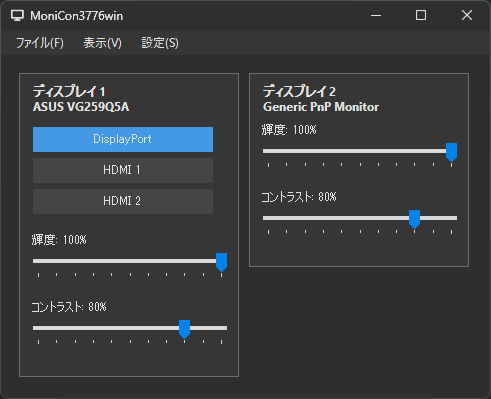
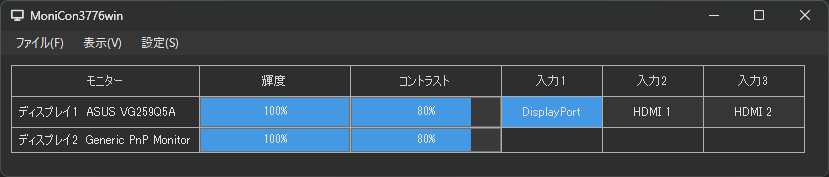
Card and Grid Views Switch between detailed card view and compact grid view to manage multiple monitors.
Brightness & Contrast Adjust the brightness and contrast of each monitor intuitively using sliders.
Input Source Switching Directly switch active input sources like HDMI or DisplayPort from a dropdown menu.
Hotkeys and Auto-hide Instantly show the app using global hotkeys and optionally auto-hide it to the screen edge.
Requirements

Basic requirements and supported devices for MoniCon3776win.

OS
Windows 10 / 11
Monitors
Requires DDC/CI compatible monitors.
Inputs
HDMI, DisplayPort, DVI, VGA, etc.
Portable
Runs as a single executable without installation.

Screenshots

Examples of the card mode and grid mode views.

MoniCon3776win grid view demo
Grid mode showing multiple monitors in a compact list for easy management.
MoniCon3776win card view demo
Card mode showing detailed settings and sliders for each monitor.

Latest Release Notes

The latest information is fetched automatically from GitHub Releases.

All Releases
Loading Fetching release notes.

Notes

VCP Codes MoniCon uses standard VCP codes to communicate. Some monitors may not fully support all commands.
Admin Rights Generally not required, but certain display driver configurations might need elevated privileges.